

The CycleSic manual is the official operating guide to Emiciclo's cyclic-analysis terminal. Each chapter starts with a real task, uses the labels visible in the interface and separates the user's action from the software's observable result.
In brief — On your first visit, follow this order: first start, interface, indicators, drawings, layouts and alerts. Read a cyclic output only after checking the asset, timeframe and data.
Transparency and trade secrets — Emiciclo publishes Cyclepedia and produces CycleSic. This manual documents controls, inputs, visible outputs, dependencies and errors. It does not disclose or attempt to reconstruct proprietary formulas, coefficients, calibration, code or hidden rules.
Recommended path
- First start, assets, timeframes and data.
- Markets, worklists and CSV files — find an instrument, use ALL or the Emiciclo list, or work with local data.
- Interface and chart views.
- Live data, NOW and continuity — verify freshness and recover after an interruption.
- Cyclic analysis, composite and spectrum.
- Indicators.
- Elliott Wave — read the count, reliability, invalidation, zones and revisions without treating them as signals.
- Drawings and measurements.
- Tabs and workspaces — separate analyses and open a layout without cloning the current one.
- Layouts and snapshots.
- Settings and mobile use.
- Integrated course and Nicola — start, resume or review lessons inside the app.
- Alerts.
- Common problems.
How to read each procedure
The essential idea comes first, without jargon. Next come the steps and the result to look for on screen. Professional checks, limits and edge cases appear at the end.
The contract is always visible control → action → observable result. When something does not happen, the guide separates missing data, loading, access, error and a genuine zero result.
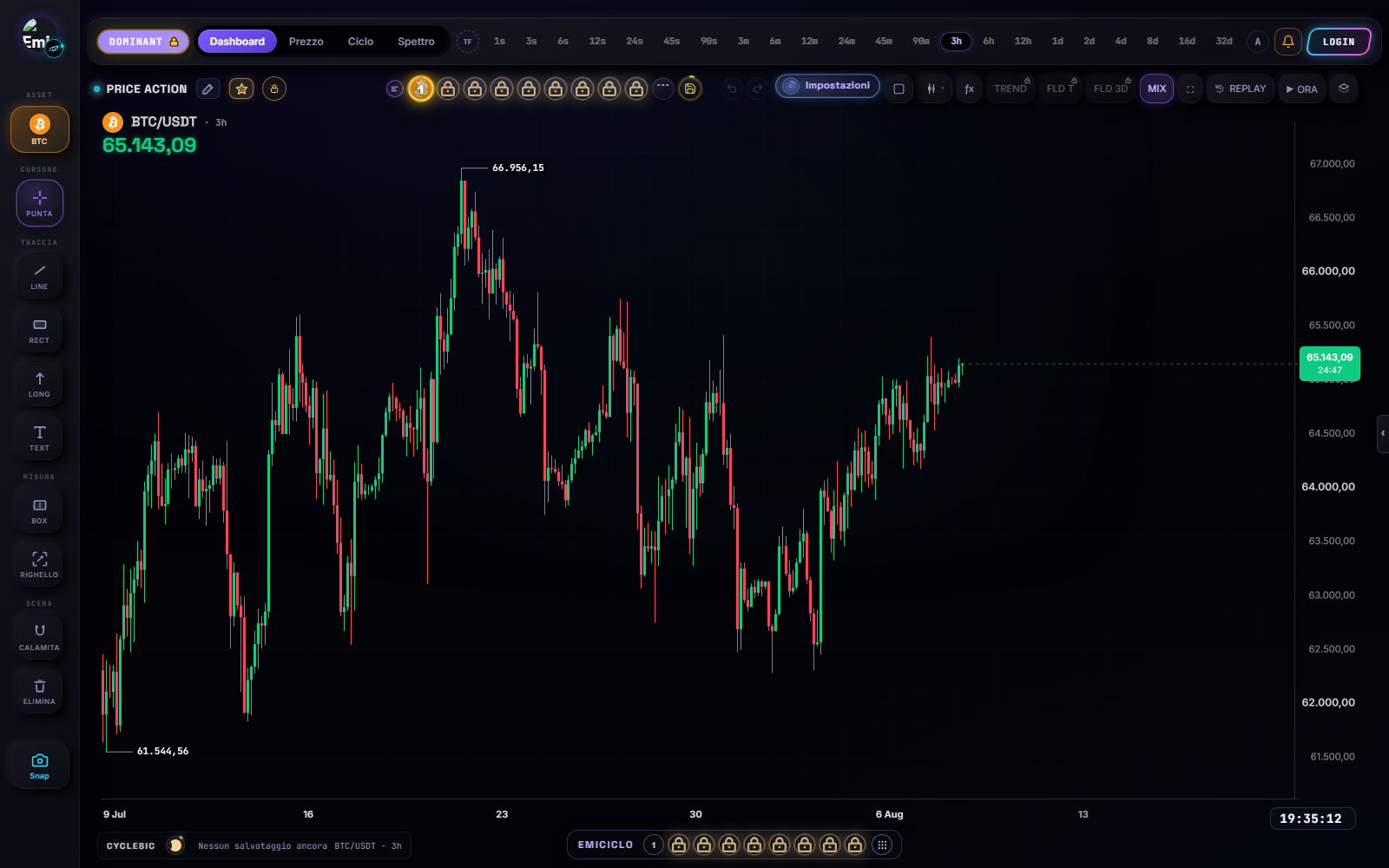
Interface map
- Top bar: asset, timeframes grouped by unit, Auto, session commands.
- View tabs:
Dashboard,Price,Cycle,Spectrum. - Chart: candles, axes, cursor, indicators and drawings.
- Analysis mode: the visible pill, such as
LEGACYorDOMINANT, selects an analysis configuration; it is not a chart view. - Overlays:
MIX,TREND,FLD TandFLD 3Dshow or hide connected readings when available. - FOCUS and NOW: FOCUS changes the framing;
NOWreturns the camera to the present. Neither one switches real-time data on or off. - Right-hand column (desktop): object tree, watchlist, ƒx, Cycle Intelligence, alerts, drawings, overlays, Trade ON (
$). - Drawing dock: selection, objects, measurements, undo, redo and delete.
- Settings: appearance, analysis, alerts, trade, system and tutorials.
- Bell: active alerts and event history.
- Snapshot and layouts: image export and reusable configurations. The PWA/Windows strip
+opens Cosmo or a personal layout.
Minimum check before analysis
Confirm the correct asset and market, timeframe, sufficient history, last candle and time, no obvious data gaps, the required session and permissions, and that calculation has completed. A blank output is not automatically zero: it can mean missing data, loading, unavailable service or missing permission.
Nicola as a manual tutor
On CycleSic pages you can ask Nicola “how do I change timeframe?”, “where are indicators?” or “why is this panel blank?”. The Integrated course and Nicola chapter explains the lessons already available inside CycleSic. In both cases Nicola must name the control, action and expected result from indexed sources, and say when the documentation does not cover a case.
Sources
- CycleSic in the Emiciclo app — official operating interface.
- CycleSic product overview — scope, access and general limitations.
- Cyclepedia technical check: navigation and comparison on 2026-08-28 with the
cyclesic-v2/runtime, including the market catalogue, worklists, CSV import, live continuity, desktop chrome, tabs, layouts, tutorials, snapshots and alerts.