

Nicola's course inside CycleSic teaches with the real terminal: it points to a control, asks for an action and checks the next stage. It does not replace the manual; it is the quickest way to see features while using them.
Essential idea — The course teaches the flow. Cyclepedia keeps the definitions, procedures, limits and sources you can revisit afterwards.
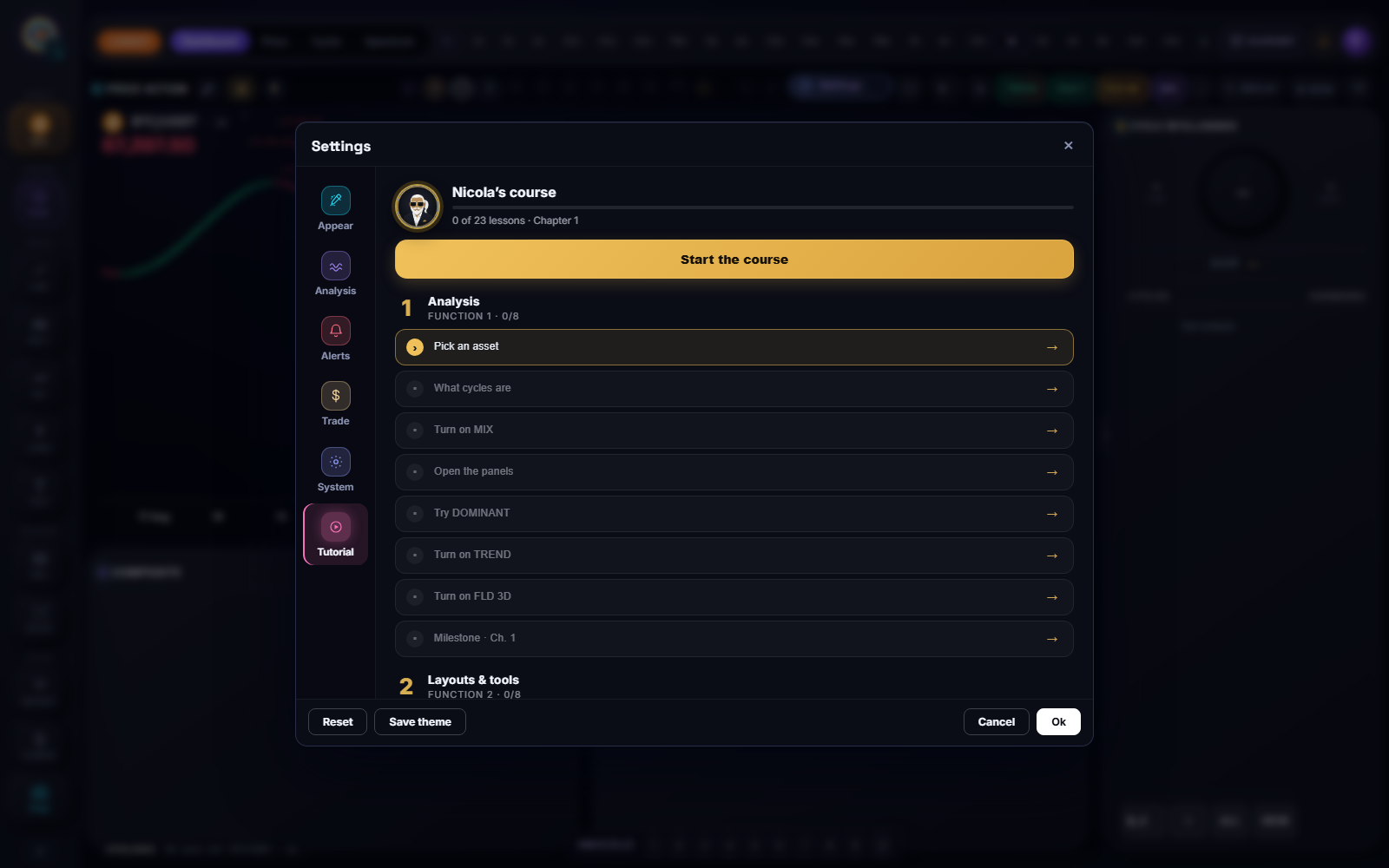
Documentation boundary — The path, controls and visible progress are documented. Internal lesson-validation rules and Nicola's proprietary logic remain excluded.
Open the course
- Open Settings.
- Select Tutorial.
- Choose Start the course, Resume from or one lesson.
- Follow Nicola's instruction on the highlighted control.
- Complete the action before advancing.
The panel reports completed lessons and the next stage. Once finished, you can review from the beginning or reopen only the part you need.
Chapter 1: orient yourself and read cycles
The first chapter covers the foundations: choose an asset, understand what cyclic analysis observes, turn on MIX, open panels, try DOMINANT and expose TREND and FLD.
For a beginner, the goal is not to interpret every curve immediately. Learn to answer three questions first: which market, which timeframe and which surface is active?
Chapter 2: build a workspace
The second chapter introduces the Emiciclo showcase, personal layouts, available engines, panels, alerts and chart drawing. It moves from navigation to a repeatable working configuration.
After each lesson, verify the visible output: occupied slot, listed indicator, recorded alert or selectable object. A lock describes current access, not a failed lesson.
Chapter 3: connect the ecosystem
The third chapter shows how CycleSic connects to the rest of the app: Trade view, history, Cosmo, Ufficio, exchange connection and the path to Tournaments, Cyclic Dashboard and Assembly.
These stages explain movement between products. They do not turn CycleSic into a broker or authorise orders. When a lesson opens another area, use that product's manual for its requirements and limits.
Resume and progress
Resume from finds the first unfinished lesson. Progress is stored in the browser, so it can differ on another device, in private browsing or after local data is cleared.
If the course restarts, that does not mean your account lost layouts or analysis. First check browser and browsing mode.
Course tutorial and gesture tutorial
They are separate tools:
- Nicola's course teaches a three-chapter functional path;
- Gesture tutorial shows tap, drag, long press and panel gestures, especially on mobile.
If you know the intended function but touch does the wrong thing, run the gesture tutorial. If you do not know which function to use, resume the course or open this manual.
Learn without altering important work
Before an advanced lesson, save your personal layout or use a practice context. The tutorial can turn on surfaces, open panels or change visible state to demonstrate a feature. At the end, re-check asset, timeframe, mode, indicators and alerts before returning to operational analysis.
Ask Nicola after a lesson
On Cyclepedia pages, ask concrete questions such as “How do I resume the CycleSic course?”, “What is the difference between MIX and DOMINANT?”, “Why does the gesture tutorial not open a panel on mobile?” or “How do I save the layout shown in chapter 2?”.
A useful answer should point to the relevant procedure or limit. If the documentation does not support a behaviour, Nicola should say so rather than inventing it.
Troubleshooting
- Tutorial does not open: wait a few seconds; the module loads on demand. Reload if the issue persists.
- It will not advance: perform the requested action and close overlapping panels.
- Progress disappeared: check browser, device, private mode and local data.
- A feature is locked: read the access message; the tutorial does not change your account plan.
- Mobile gesture is ambiguous: leave the course and run Gesture tutorial from the same area.
Sources
- CycleSic in the Emiciclo app — built-in course and gesture tutorial.
- Settings and mobile use — preferences and gesture access.
- Nicola's Cyclepedia manual — how to ask and verify sources.
- Cyclepedia technical check: verified on 2026-08-26 against curriculum, resume logic, local progress, lazy loading and the gesture tutorial in
cyclesic-v2/.