

On a phone, the five tabs are in the bottom bar. The active tab scrolls vertically while the bar remains available.
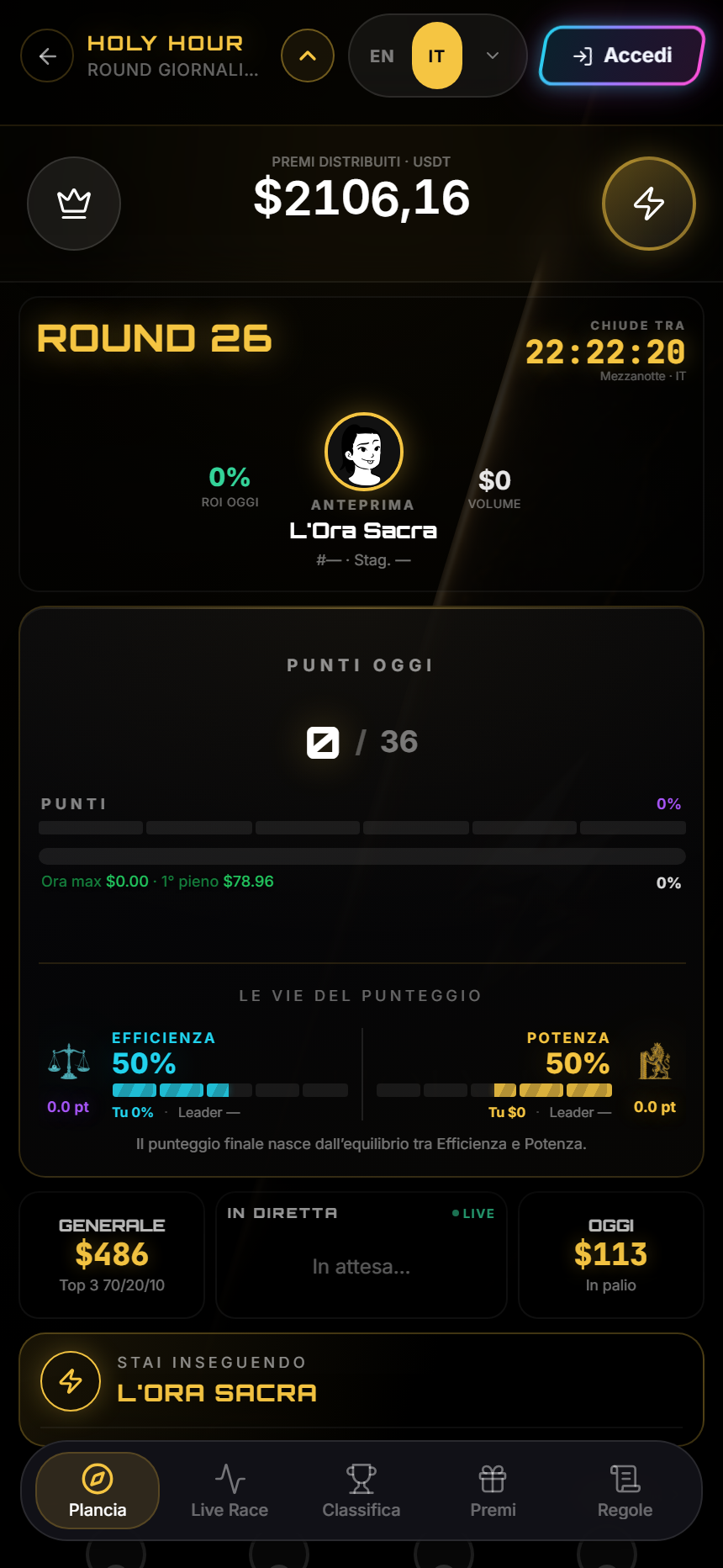
Touch rule — Essential information should not require hover. In charts and rankings, tap to select and tap again or use the close control to exit; drag only in visibly scrollable areas.
Find your way
- Left arrow: return to the hub or previous view.
- Up arrow beside the title: open the zone switcher.
- Cockpit, Live Race, Leaderboard, Prizes, Rules: bottom bar.
- Language and sign-in: upper corner.
Reliable actions
- Tap a tab and wait for its title to change.
- Scroll vertically inside the content, not on the bottom bar.
- Use visible metric and style buttons in charts.
- Tap a row or point for detail; do not rely on finger hover.
- Rotate only when a chart needs width; return to portrait for the Cockpit.
When layout looks clipped
Close the keyboard, return to the top of the tab and reload once. Check browser zoom and orientation. If the bottom bar covers a control, record device, browser, route and screenshot.
Observable result
Mobile use is correct when every tab, zone switch and selected detail works without mandatory hover or zoom.
Sources
- Tournaments in the app — responsive interface.
- Common problems — navigation and loading diagnosis.
- Cyclepedia technical verification: 430 × 932 viewport, touch emulation, mobile bar and scrolling checked on 2026-08-26.