

On a phone the Board keeps the same two operational views. Controls move and stack to leave room for Sundial or Composite; you do not need a mouse hover.
Documentation boundary — This page covers visible mobile controls and gestures. It does not expose proprietary analysis logic.
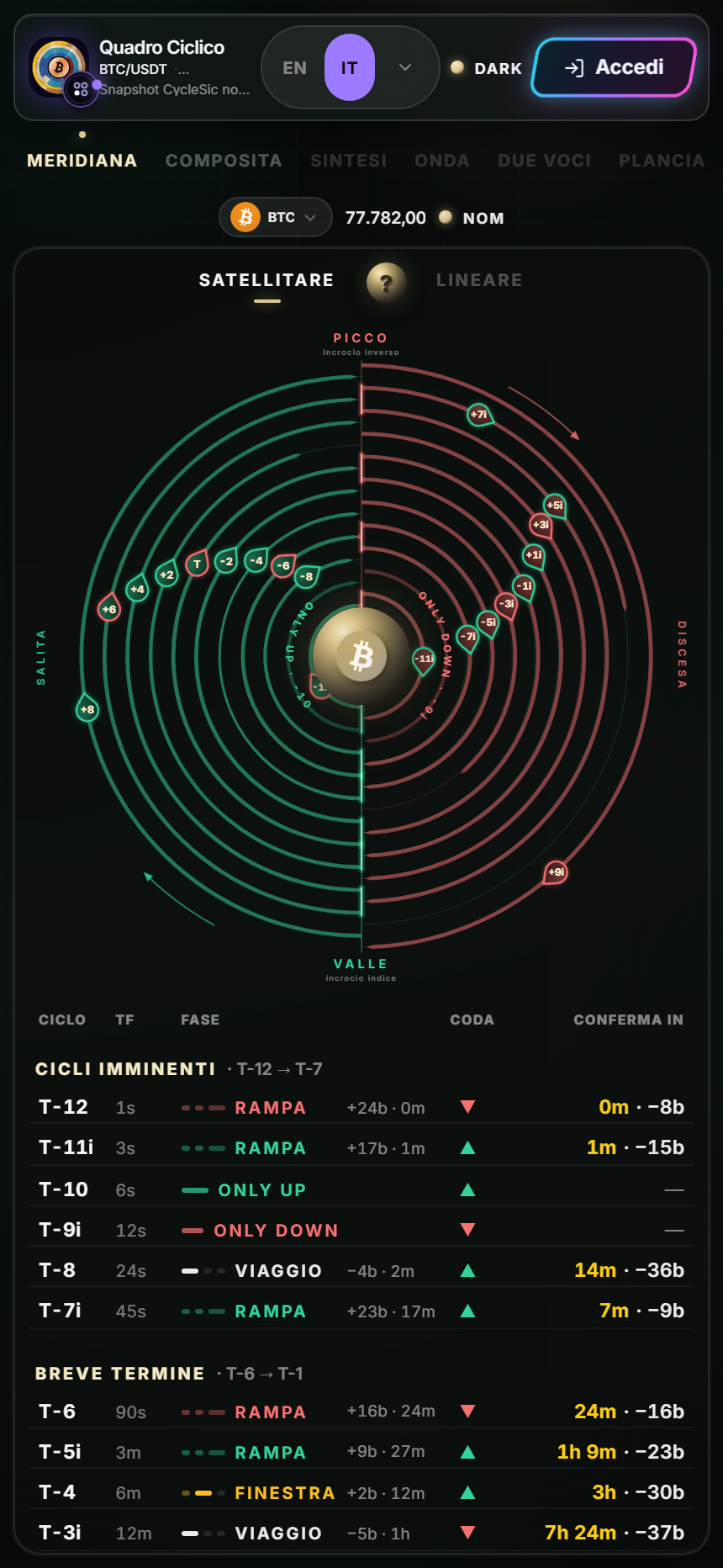
Where controls move
The tabs can scroll sideways. Below them are asset, price and mode; Sundial then shows Satellite / Linear. Coming-soon tabs may remain visible but disabled, which is intentional rather than a session error.
Main gestures
- Single tap on asset: opens the market selector.
- Tap Sundial or Composite: switches view.
- Tap a satellite, ring or row: opens available detail.
- Horizontal swipe: reveals hidden tabs or columns.
- Vertical swipe: moves through the view and table.
If a gesture scrolls instead of opening detail, stop movement and use a brief tap near the center of the element. A long press is not required.
Essential information should be available by tap through the degree card, Composite Focus or the ? help control where present. Browser installation prompts are separate from data and permissions.
Before using a reading after the app returns from the background, recheck symbol and timestamp. The operating system may have suspended the page.
Sources
- Cyclic Board in the Emiciclo app — official mobile surface.
- Sundial guide — meaning of degree taps.
- Cyclepedia technical verification: 430-CSS-pixel layout, scrolling tabs, selector, representations and table checked on 2026-08-25.